Syncing MDP modules before first use
Sync your source modules and metadata profile in catalog config before you use the Migration Portal. The sync adds properties to your MDP configuration items so the portal can detect them. Until you sync, the portal pages show no items. For example, Asset Types lists no asset types and shows a count of types that are hidden because they have no MDP configuration.
Important
You need access to catalog config for the organization you plan to review.
To sync MDP modules:
Open the Catalog Configuration catalog for your organization.
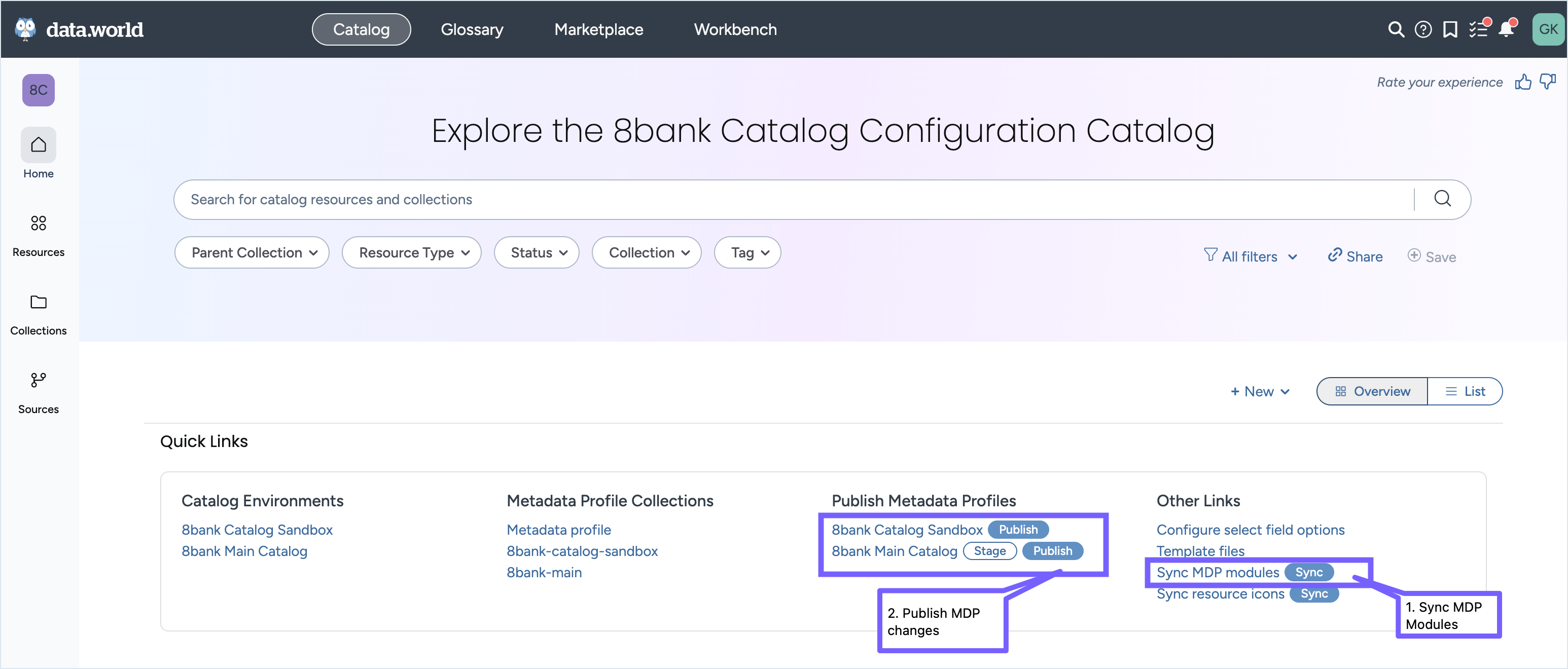
In Quick Links, under Other Links, next to Sync MDP modules, select Sync.
The source-modules.ttl file opens in the Data Catalog Configuration project in Workbench.
In the About this file panel, select Sync now.
Return to the catalog. Under Publish Metadata Profiles, publish the metadata profile for the organization that you plan to review.
For a sandbox organization, select Publish.
For a main organization, select Stage, and then select Publish.
Return to the Migration Portal, and reload the page.
Repeat the sync for each organization, such as your main and sandbox organizations.